|
PC
Control
|
Smart Focus
Remotely Control a Focus Motor through PC Software (Requires
an Encoder Assembly)
SFDRO
$399
Purchase
from Farpoint |
|
|
Smart Focus
The Smart Focus system allows one to remotely control a
JMI focuser or
MOTOFOCUS unit
(not included) using computer software. Popular CCD software (not included) can be used to automatically focus a CCD
camera (a couple of examples are listed below).
For more information, see
Purchasing Hints and Motor Control Diagrams where you can
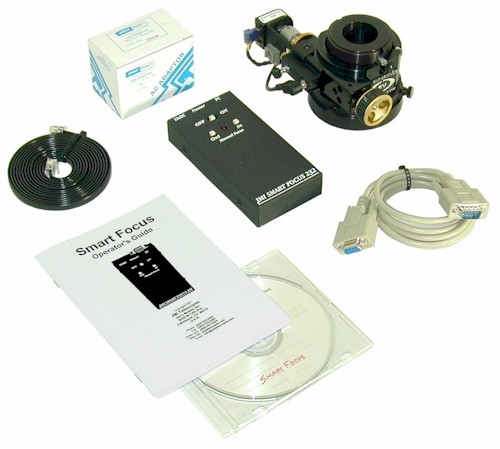
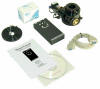
compare PCFC and Smart Focus. Smart Focus includes a hand control, AC adapter,
focuser/encoder cable, serial computer cable and basic focuser control software. The hand
unit has two directional focusing buttons, a power
jack, a DB-9 serial connector and a DRO encoder jack. It can be operated
using a 9-volt alkaline battery (included).
One end of the
focuser/encoder cable attaches to the hand control and the other end to the
DRO encoder assembly installed on the JMI focuser or
MOTOFOCUS motor (required, see below). The
serial cable connects between the hand control and the 9-pin serial port of a PC-compatible computer running Windows
95/98/NT/2000/XP/Vista/7.
Most current laptops do not include a 9-pin
serial adapter. Therefore, you will need to purchase a USB to Serial Adapter
(USB to 9-pin Serial). If you purchase a USB Null-Modem Serial Adapter you
will also need a straight-through 9-pin serial cable as apposed to the 9-pin
null-modem cable which we supply (please
see note regarding serial ports).
JMI's standalone basic focuser control software
(included on our website, call for a CD) is sufficient to control the focuser through the PC. Automatic
focusing can be accomplished through popular CCD imaging
software (not included) such as Cyanogen's
MaxIm DL/CCD (using SharpStar) and Software Bisque's CCDSoft
(using @Focus).
Due to the modular design of the JMI EV
focusers, they can be very easily upgraded after purchase to include Smart
Focus.
|
NOTE
|
Smart Focus requires one of the
DRO Encoder Assemblies for a motorized JMI
Focuser or MOTOFOCUS unit (not included).
Smart Focus includes an A/C adapter, focuser/encoder cable, serial
cable and software.
Smart Focus will only work correctly
with MOTOFOCUS units that can accommodate an encoder and use a non-slip coupler. If your current MOTOFOCUS system uses a slip-clutch feature, such as an o-ring coupler, ask us
about a conversion kit. Since the Smart Focus stand-alone basic focuser
control software is designed around slippage at the end of focuser travel,
manual setup procedures must be used with MOTOFOCUS equipped focusers (see the
Smart Focus Manual, document 29, in our Document
Library). Smart Focus is not recommended for use with an SCT focus
knob due to image shift (mirror slop) and the inability to train the system
normally.
Are you in need of (more) serial
ports on your computer? See how
you can add more RS-232 serial (DB9 connector) ports.
|
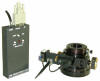 |
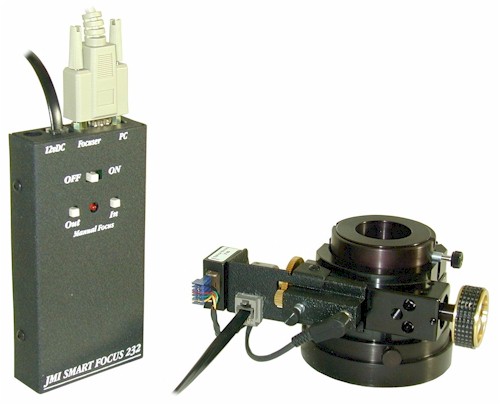
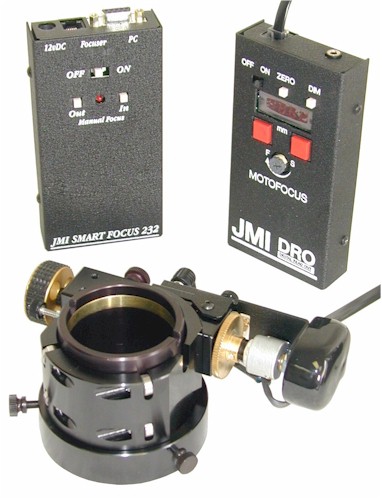
An
EV-2cM is shown here with the DRO encoder
and hardware installed and a Smart Focus hand
unit. These components (Smart Focus hand unit, DRO encoder with
mounting hardware and Focuser or MOTOFOCUS) make up the complete Smart Focus system.
The Focuser and DRO encoder and hardware must be purchased separately. |
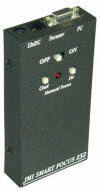 |
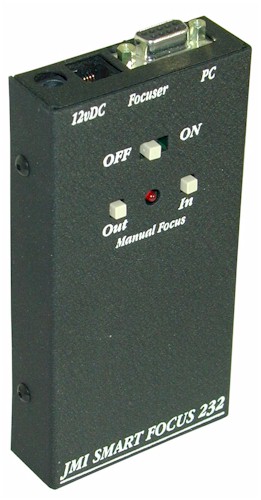
The top end of the Smart Focus Hand Unit
includes a power jack, telephone-style jack for connecting to the focusing
device and a DB9 (RS-232C) jack for connecting to the PC. |
|
|
|
PC Focus
Control
Remotely Control a Motor through PC Software (No Encoder
Assembly Required)
PCFC
$179
Purchase
from Farpoint |
PC
Focus Control for Second Motor
Remotely Control a SECOND Motor
PCFC2
$179
Purchase
from Farpoint* |
|
|
PC Focus Control
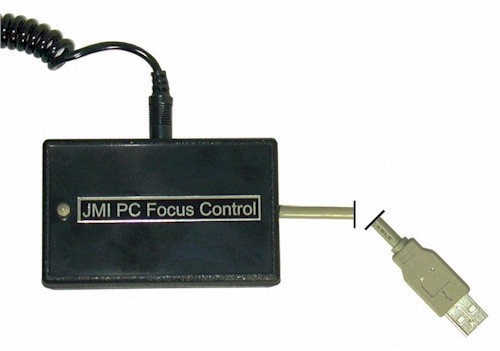
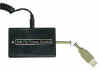
PCFC controls a DC focuser motor from your PC through
a USB port. Basically, it replaces a
regular hand unit with control from a computer using a mouse. It gives
greater control of speed and duration of movement than a regular hand
unit. It can control EV Focusers, NGF
Focusers, RCF
Focusers, MOTOFOCUS, MOTODEC
and other motors. No batteries are
required. There is no
encoder feedback or positional display with PCFC. If you desire
focus control with encoder feedback, please see Smart
Focus. For more information, see Purchasing Hints and
Motor Control Diagrams where you can
compare PCFC Smart Focus.
Requirements:
· 5-12 volt DC motor (works best with 5V motor)
·
Motor cable with 1/8" (3.5mm) mono plug on the PC Focus Control end
·
Windows 98 Second Edition / NT / 2000 / XP / Vista / 7 / 8 / 10
·
USB version 1.1 or greater (NOTE: Win98SE
may need to be upgraded)
·
Human Interface Device driver (HID) usually included with the operating
system
Includes:
· Control Box with integrated USB
cable (3 ft length) and 1/8" (3.5mm) motor jack
(the unit is powered by the USB port)
·
Software (Free Download from JMI website)
· Operator's Manual (can also
Download for Free from JMI website)
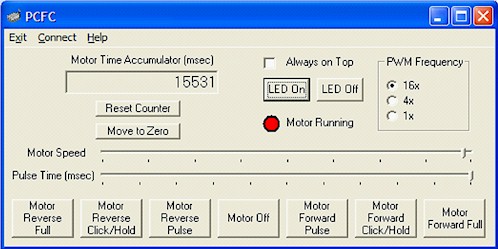
Software Console Controls:
· Pulse-width modulation
(PWM) Frequency
Adjustment
·
Motor Speed Adjustment
· Pulse Time Interval Adjustment
·
Continuous Motor Operation in Forward or Reverse
·
Mouse Controlled Time Interval Motor Operation in Forward or Reverse
·
Specified Pulse Time Interval Motor Operation in Forward or Reverse
· Motor Time Accumulator with Move (Return) to
Zero Function
· Motor Running Indicator
* Many astrophotographers
need to use two focusers, one for their imaging scope and one for their guide
scope. PCFC2 was created for this purpose. It is identical to the
PCFC hardware in all respects except for its USB identifier. Now you can
run two focusers, one from a PCFC, and one from a PCFC2. Separate software
is required (Free Download
from JMI website).
| NOTE |
The focuser cable must
be purchased or supplied separately. |
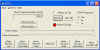 |
The PC Focus Control
(PCFC) software allows one to control the pulse run time and speed of a
5-12 volt DC motor from a Windows-based computer. |
|
|
|
|
Digital
Readout
|
|
|
|
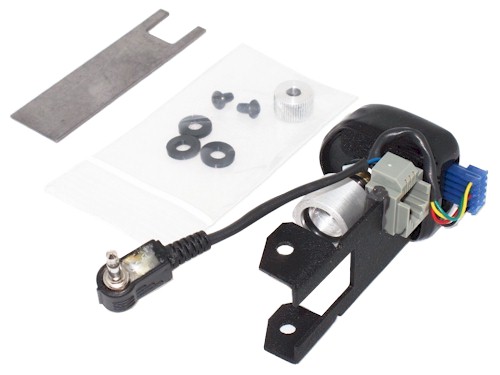
DRO Encoder Assembly for JMI
Focuser
This is the portion of a DRO system that attaches to the
JMI EV or NGF focuser.
(Specify the focuser model.) A Smart Focus
unit is also necessary for proper operation.
Due to the modular design of the JMI EV
focusers, they can be very easily upgraded after purchase to include the DRO
Encoder Assembly.
If you do not have a motorized version, see our EV Focuser Individual Parts
for a motor upgrade. For a visual description of the system see
Motor Control Diagrams where you can
compare PCFC and Smart Focus.
EV-1
/ -2 / -3 / -B focusers, Part Number DROEV
NGF-XTcM
/ -XTnM focusers, Part Number DRONGFXT
NGF-CM
/ -55DM / -DX1M / -DX2M focusers, Part Number DRONGFC
Newer
than 1997 NGF-S focuser, Part Number DRONGFS
NGF-1M / -2M / -3M / -4M
/ -55SM, older than 1998 NGF-S focusers, Part Number DRONGFO
NGF-DX3M / -DX4M
/ -miniCM / -miniS / -mini1M / -mini2M / -mini3M /
-mini4M focusers, Part Number DRONGF
*
For some NGF models, you will need to return the focuser to the
factory for modifications. Additional charges may apply
for parts and/or labor. (For more specific information, please review the
notes below.)
For all JMI focusers we need to have certain
information in order to supply the correct parts. When ordering, please place a note in the shopping cart Comments area
identifying the focuser. For
Event Horizon (EV) focusers, "EV" is sufficient
information. For all other focusers, specify the model and date of purchase
(date of manufacture if known).
A
digital picture is "worth a thousand words" in
describing the specific model. If you email a picture,
please give us your Order ID along with your Name. If we need more information, we will contact you.
|
|
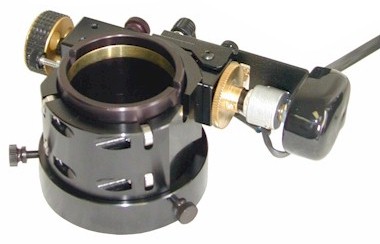
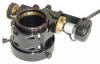
This picture
shows the EV-2cM
focuser equipped with an Encoder Assembly.
The
DRO Encoder Assembly
can be retrofitted to any of our old NGF focusers. A motor must be included with
the focuser. For an aftermarket upgrade of a manual NGF to the required
motorized version,
refer to Motors
for JMI NGF Focusers on our Focuser
Accessories page of our
Online Store.
In most cases you do not need to return the
focuser for the upgrade. All NGF-1 focusers being upgraded with a
motor must be
returned for modifications to the base. If you have an original NGF focuser (see DRONGFO listed
above) we recommend that the focuser be returned to
JMI for the motor and DRO upgrades. With some of these original focusers
we may not be able to provide the right parts without
examining the
focuser and there may be an extra charge for specialized parts and/or labor.
The normal
labor charge for an upgrade is $20.
If you place an order without returning the old focuser, we
will need to know approximately when it was manufactured. Damage done during
installation by anyone other than factory trained technicians will void the
warranty. Please see our document titled JMI Return Policy for additional information.
When upgrading EV or NGF focusers at the time of purchase, the standard hand unit is not
included as this is offset by the cost of installation of the DRO Encoder
Assembly.
|
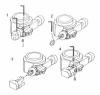 |
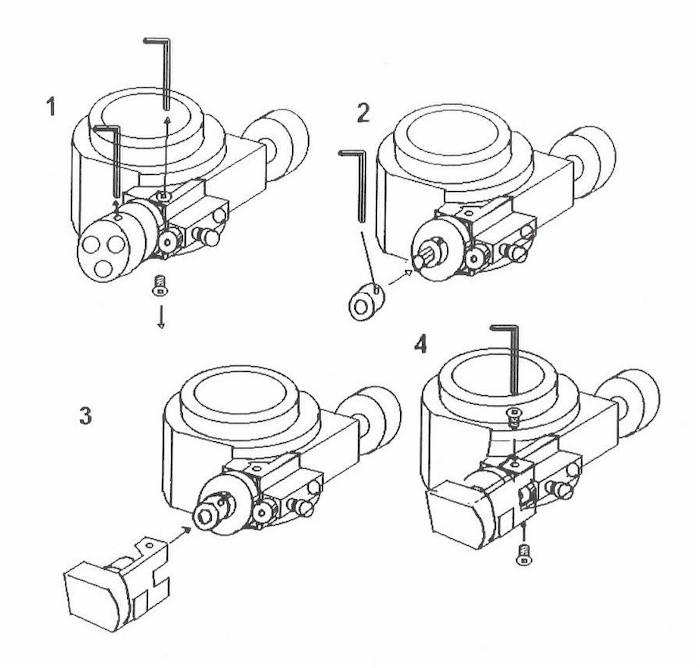
Instructions
for Installing the Encoder Assembly on an EV Focuser |
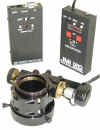 |
The
EV-2cM is shown here with the encoder
and hardware installed for a DRO system. For a
Smart Focus system, the Smart Focus hand unit (left) replaces the
DISCONTINUED regular DRO hand unit (right). |
|
|
|
|
|
|
DRO Encoder Assemby
Upgrade for
JMI MOTOFOCUS
The DRO Encoder Assembly upgrades a MOTOFOCUS
unit with a piggy-back DRO encoder assembly (see exceptions below). This is the
portion attached to the MOTOFOCUS motor. A Smart Focus
system is also necessary for proper
operation.
|
NOTE
|
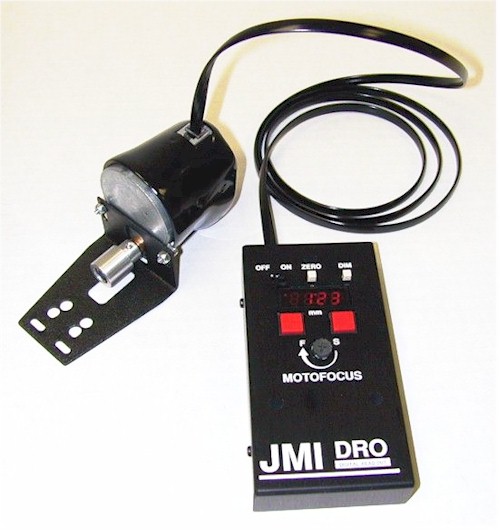
The picture at left shows our
DISCONINUTED DRO Hand Unit (right)
along with the DRO Encoder equipped MOTOFOCUS unit. Only Smart Focus is
available now.
The
piggy-backed DRO Encoder Assembly is not available for MOTOFOCUS units that use the miniature
motor (e.g. Meade ETX Series, Celestron NexStar non-GPS Series,
etc. Call to see if your choice has a miniature motor.). MOTOFOCUS units
manufactured after January 1, 2000, with our standard pear-shaped motor, are upgradeable to DRO
with an additional labor charge. They must be returned to JMI for the
upgrade. Most other MOTOFOCUS units cannot be upgraded after purchase.
If you plan on using Smart Focus
with a MOTOFOCUS unit, please see the notes under Smart
Focus above.
When upgrading MOTOFOCUS at the time of purchase, the standard hand unit is not
included as this is offset by the cost of installation of the DRO Encoder
Assembly.
|
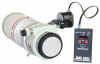 |
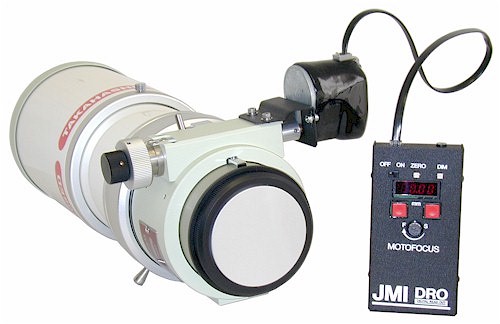
MOTOFOCUS with DISCONTINUED DRO Hand Unit Installed on a Takahashi
FSQ-106ED with Microfocuser |
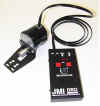 |
DRO
installed on a MOTOFOCUS
motor will be somewhat different from an installation on an EV
focuser. The accuracy
will vary depending mostly on how much slop there is in the focuser
mechanism itself. Note that
this picture shows the DISCONTINUED DRO HAND Unit (right). |
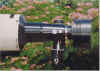 |
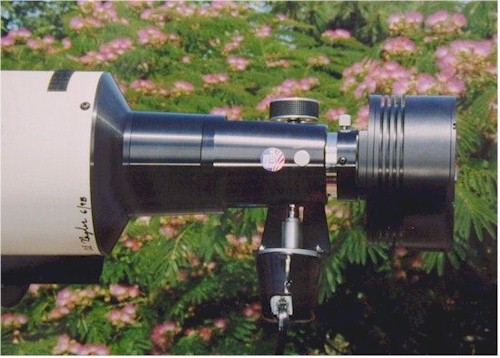
This photo shows the (MFGEN) MOTOFOCUS with DRO
Encoder Assembly mounted on a
Tele Vue 140 SDF using a CCD camera. Photo and comments
provided by Dan Richey. |
|
|
|
What
is Smart Focus™?
Smart Focus is a combination
of hardware and software for precise remote control of JMI's motorized
focusers through a personal computer's serial port. The system can
be controlled three ways: 1) manually using the control box, 2) with
the included basic focuser control software or 3) through third-party
auto-focus functions found in popular CCD imaging software such as
Software Bisque's CCDSoft
and Cyanogen's MaxIm DL/CCD. Auto-focus software automatically
brings the system into focus using the CCD camera in conjunction with
Smart Focus. (JMI's focuser control software does not include an
auto-focusing function.) The
system includes a hand control box (AC or DC power) and PC compatible
focus control software. The hand control includes a jack and cable
for connecting to the focuser and a 9-pin serial RS-232 connector and
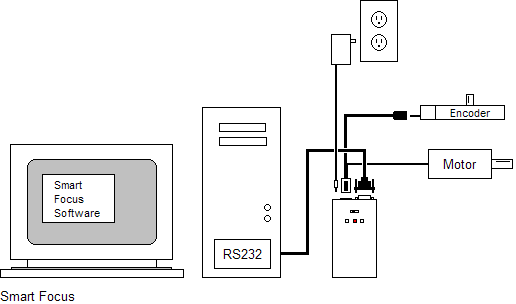
cable for software control using a personal computer. (See the diagram
below.) |
What
is PC Focus Control™?
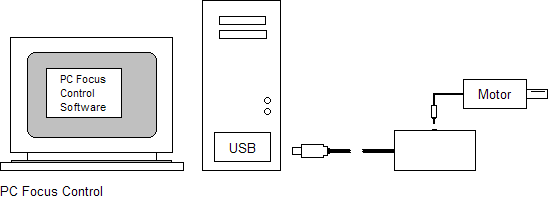
PC Focus Control (PCFC)
replaces your focuser hand unit with precise motor control from the USB
port of a Personal Computer (PC). You can use the free downloadable
JMI Windows-based software or any ASCOM-compatible software. Our testing shows that
PCFC gives much greater control than a normal hand unit and we were able
to get 0.0004" drawtube movement. There is no
encoder feedback or positional display with PCFC. If you desire PC
focus control with encoder feedback, please see Smart
Focus. (See the diagram below.) |
What is a Digital
Readout (DRO)?
Digital devices such as our
DRO Encoder Assemblies give precise discreet signals indicating increments
of movement. This movement is usually a shaft in the encoder that is
connected to moving parts of a telescope or accessory, such as a focuser, by
gears, belts or a friction drive. This digital data is fed to a device
that shows, in a digital format, the movement of the focuser.
Our original electronic Digital Readout
(DRO)
system
provided precise information on focuser position with an easy to read LED display.
The four-digit display and focus control were integrated into one DRO Hand Unit.
That unit was discontinued but we still have the Smart Focus system which
interfaces to a Microsoft Windows based Personal Computer. With
unprecedented focusing accuracy, you can return to any previous focus position after
swapping equipment or users. This is especially helpful when returning a CCD camera
to focus after visual verification of the position of your telescope.
(See the diagram
below.) |
Purchasing
Hints
Here are a few Typical
Configurations for digital focusing on a Schmidt-Cassegrain
Telescope (SCT). They include part numbers and basic specs for
comparison.
Smart Focus PC Control
with an EV-1 on
an SCT
EV1CM EV-1 Event Horizon Focuser designed for Cassegrain Telescopes with Motor included
(Model EV-1cM)
DROEV Encoder and Mounting
Hardware for EV focusers
SFDRO Smart Focus Hand Unit, Cable
and Basic Software
Requires a computer with a Microsoft Windows based operating system
Basic control software is included (Other popular CCD imaging
software can interface with Smart Focus)
Can be controlled by the computer or hand unit (included)
Encoder feedback gives accurate positioning
Greatest amount of control, accuracy and repeatability (± 0.001")
PC Focus Control (PCFC)
with an EV-2 on
an SCT
EV2CM EV-2 Event Horizon Focuser designed for Cassegrain Telescopes with Motor included
(Model EV-2cM)
PCFC PC Focus Control and Basic Software
Requires a computer and Microsoft Windows based operating system
software
Controlled by computer software (included)
No encoder feedback (more susceptible to environmental conditions)
Great amount of control and accuracy The following is a
Visual
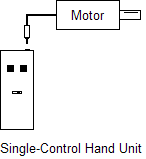
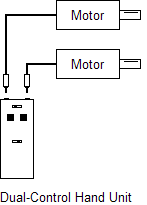
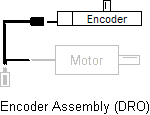
Summary of the products found on this page along with the standard single-
and dual-control hand unit configurations for comparison.
Click on parts of the
pictures above to link to related products, pictures or descriptions.
|
Customer
Comments
NOTE: Customer comments may include comments about our
DISCONTINUED DRO Hand Unit.
"Thank you so much for your personal
attention to my problem. I am very impressed. I was able to
resolve the problem with your phone support.... I am now a happy
observer enjoying my Smart Focus and will not need a
replacement." (W. D.)
"...thanks for such a well-made
product! Everything about it shows the commitment and quality your
company puts into their products. I'm looking forward to years of
seeing and imaging with [Smart Focus]!" (J. C.)
"I am very impressed with the overall
quality and machining of the NGF-CM. The DRO motor and hand unit are
very well made. The digital readout is terrific. The weight of
the hand unit seemed a bit heavy for its size, at first. Once I got
used to it, I actually enjoyed it. I consider the NGF-CM/DRO combo
one of the best purchases I have made for my trusty Celestron C8. I
also like the C8 OTA carrying case a lot. It is much nicer than
lugging my OTA around in a big foot locker not to mention much lighter and
less awkward. Thank you for your great products. (B. D.)
"I just wanted to say thanks for all
your help in getting my Smart Focus/DRO running. I downloaded the
drivers with the COM 5 variation and it worked just perfect. I did
not have a 9-pin serial port so the IOGEAR USB adapter worked just as you
suggested." (J. P.)
"This
is a short note of satisfaction. I received my upgrade to Smart
Focus last week to be installed on my NGF-S focuser. I was
positively impressed by the quality and the simplicity of the
product. It took only a few minutes to install and the touch and
feel is of a high quality product. I have used it a few times and it
is very accurate. I also used it with the Cyanogen MaxIm DL control
software using autofocus and it worked like a charm. Just wanted to
give you feedback. You have a great product." (R. L.)
"I have an NGF-S with DRO.
It is a real pleasure to use and it works flawlessly. It's another credit to your
fine craftsmanship.... I absolutely love (it). It's a real gem and has
made accurate focusing easy to achieve." (L. D.)
"...The
[MOTOFOCUS with DRO] runs smoothly and accurately. Thanks
for your good workmanship and excellent service." (D. R.)
"It is nice to deal with a
company that is sincerely committed to offering a top-quality product and backing it up
with customer service to match. Needless to say, whenever I need an accessory for my
scope, I'll call JMI." (J. E. G.)
|
|
Frequently Asked Questions
(FAQ)
|
| Q. |
I get
the following error message when attempting to run the PCFC software:
Component 'MSCOMCTL.OCX' or one of its dependencies not correctly
registered: a file is missing or invalid
What is the problem? |
| A. |
You can find the
answer at http://www.majorgeeks.com/faqshow.php?id=8
The relevant contents of that page are reproduced here:
Sometimes certain Microsoft Libraries
can become unregistered when installing and uninstalling a lot of
software. One very common problem is the MSCOMCTL.OCX.
To correct the error, first search your drive for MSCOMCTL.OCX to
see if you have it. If not, you can download it from HERE.
The file should be placed in your C:\WINDOWS\SYSTEM directory or
C:\WINDOWS\SYSTEM32 if you are using WinXP. Once it is there
click START > RUN and type "REGSVR32 MSCOMCTL.OCX"
(No quotes) in the box. That should fix the problem.
|
You can also download the above mentioned
file here from our website.
|
| |
|
| Q. |
I
do not have enough serial ports to use Smart Focus with the telescope
control software I am using. What can I do? |
| A. |
See
some options for adding serial
ports through a USB port or PCMCIA slot. |
| |
|
| Q. |
I would like
to control the system from a distance. How long can the control cable be? |
| A. |
We have sold many
cables with lengths of up to 150 feet without any problems. Anything longer may work
but will not be guaranteed to operate properly. |
| |
|
| Q. |
My
computer places Smart Focus on a COM Port numbered higher than the maximum
of 5 allowed by Smart Focus. What can I do? |
| A. |
Check for forced COM port addresses and/or IRQs in the
Windows Device Manager or in the BIOS settings. If this is the case,
determine the reason that these items have been configured manually. If you
allow the computer to use automatic settings, it should alleviate any
problems. If not, try forcing Smart Focus to a lower COM Port via the
Device Manager or BIOS and reboot, allowing all other devices to be assigned
a port and IRQ automatically. You should be able to accomplish this by
manually applying or forcing a particular address/IRQ combination to the serial port
(or USB port if using a USB to Serial adapter). |
| |
|
| Q. |
Is there a
discount when purchasing a "C" series focuser (EV-1c,
EV-2c, EV-3c, EV-Bc) with Smart Focus since the Smart Focus hand unit replaces the regular
hand unit? |
| A. |
No, the reduction
one might otherwise receive due to the removal of the regular hand unit is offset by the
cost of installing the DRO Encoder System on the focuser. |
|